
Appearance
Artifact cache
DepGate can keep a copy of each package file it downloads from a public registry on the local disk of each replica. The next request for the same file is served from that disk instead of the registry. Installs run at disk speed, public registries such as Maven Central stop rate-limiting you, and files already cached keep installing while a registry is down.
The production setups in deploy/ start with the cache on. Elsewhere it is off until you give each replica a disk and switch it on in Settings → Artifact cache, as described in Turn on the cache.
What the cache does
Every download still goes through the full policy decision first. The cache only replaces the download from the registry, after the decision allowed it:
- DepGate authenticates the request, applies namespace protection and evaluates your policies, exactly as without the cache.
- A blocked download gets its 403. The cache is not read.
- For an allowed download from a public registry, DepGate serves the file from disk when it has it.
- Otherwise DepGate streams the file from the registry to the client, and stores it on disk at the same time.
Because the decision runs on every download, a policy you add later applies at once to files already in the cache. You never need to purge after a policy change or a malware match.
Each package file response carries an X-DepGate-Cache header:
| Value | Meaning |
|---|---|
HIT | Served from this replica's disk. |
MISS | Downloaded from the registry and stored. |
BYPASS | Downloaded from the registry and not stored: an internal remote, a file type the cache never keeps, a file over the size limit, the cache is off or full, or the same file is already being stored. |
The Dashboard counts, Monitoring and Log streaming see a cached download the same as any other.
What is cached
Only files from public remotes are cached, including each ecosystem's default remote. Files from internal remotes, such as Artifactory or Nexus, are never cached. Metadata is never cached here; DepGate already caches it in Redis.
| Ecosystem | Cached | Never cached |
|---|---|---|
| npm | Tarballs | Package documents |
| PyPI | Wheels, source archives, .metadata files | Simple index pages |
| Go | .zip, .mod, .info | Version lists |
| Maven | Release .jar, .war, .aar, .pom, .module, with their checksums and .asc signatures | maven-metadata.xml, -SNAPSHOT versions |
| NuGet | .nupkg, .nuspec | Service index, registration, search |
| Cargo | .crate | Sparse index |
| Composer | Dist archives of tagged versions | Package metadata, dev- branches |
| RubyGems | .gem files | Compact index, specs |
When a virtual repository searches several remotes, DepGate caches a file only when it already knows which remote serves it, for example from the package metadata. It never serves a public copy ahead of an internal remote it did not ask.
An npm version that the registry removed from the package is no longer served from the cache. In the other ecosystems, removed versions leave the cache when they expire (see Limits and expiry).
Each replica has its own cache
Each replica caches on its own local disk; replicas share nothing. A new file is downloaded once per replica, no network file system or object storage is needed, and a replica restarted with an empty disk fills its cache again on its own. Never point two replicas at the same directory.
Limits and expiry
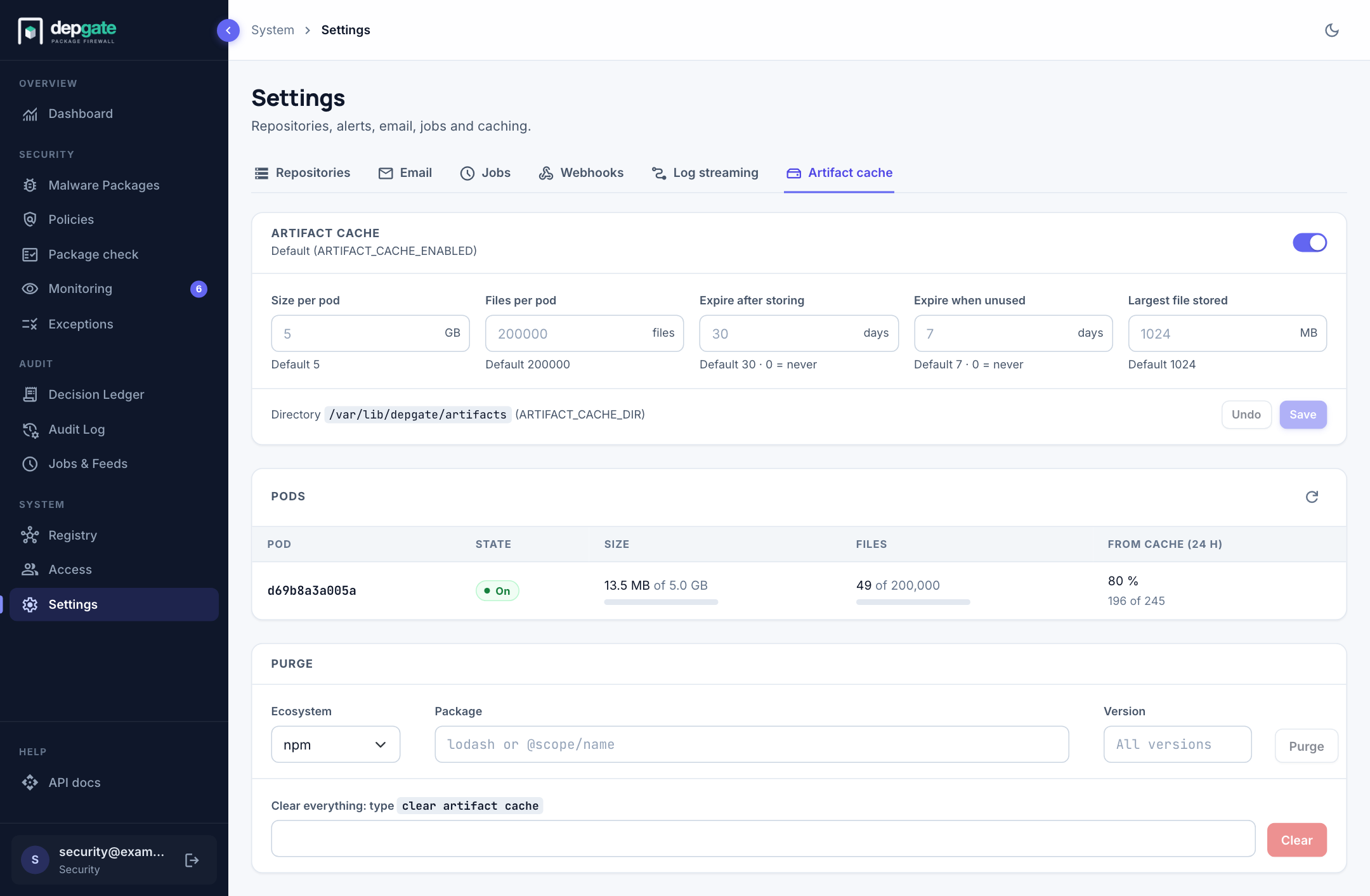
Each replica limits its cache by total size and by number of files, and removes files by age and by idle time. Change the limits in Settings → Artifact cache and choose Save: every replica applies them within seconds. The environment variables give the defaults; an empty field in Settings uses the default.
| Setting | Variable (default) | Default |
|---|---|---|
| Size per pod | ARTIFACT_CACHE_MAX_SIZE_GB | none: required before the cache can be turned on |
| Files per pod | ARTIFACT_CACHE_MAX_FILES | 200000 |
| Expire after storing | ARTIFACT_CACHE_MAX_AGE_DAYS | 30 days (0 = never) |
| Expire when unused | ARTIFACT_CACHE_MAX_IDLE_DAYS | 7 days (0 = never) |
| Largest file stored | ARTIFACT_CACHE_MAX_FILE_MB | 1024 MB |
The Directory is set by ARTIFACT_CACHE_DIR only. It must be a volume mounted at the same path on every replica, which the web interface cannot check or create.
- Each replica never uses more than the free space of its disk, minus a reserve of 5 % of the disk (at most 10 GB). When that is less than Size per pod, the table of pods marks the replica's size with disk.
- A lower size or file limit removes the least recently used files at once. A shorter expiry applies from the next download.
- An expired file is never served. The next request downloads it again.
- When the size or the file count reaches 95 % of its limit, DepGate removes expired files, then the least recently used files, until both are at 90 %. This also runs every 10 minutes.
- A file larger than Largest file stored is served but not stored.
Sizing the limits
- Size. Set Size per pod below the size of the volume, leaving room for files being written: 80 GB on a 100 GB volume is a good start. The value is in GB of 1024³ bytes.
- Files. The default of 200,000 files suits most teams. Raise it on a large volume with many small packages, such as npm.
- Age and idle time. The defaults keep a team's working set warm. Shorten the idle time if the disk fills with versions from old branches.
Watch Settings → Artifact cache for a few days after you turn the cache on. A replica that sits at its size limit with a low hit rate needs a bigger volume.
Turn on the cache
- Give each replica a volume on local SSD. The Compose setups in
deploy/mount a named volume at/var/lib/depgate/artifacts; the Kubernetes manifests give each pod anemptyDir. See Install on Kubernetes → Artifact cache. - Open Settings → Artifact cache, enter Size per pod (below the volume size) and choose Save.
- Turn on the switch next to Artifact cache. Every replica switches within seconds and is listed with the state On.
To configure everything with environment variables instead, set ARTIFACT_CACHE_ENABLED=true and ARTIFACT_CACHE_MAX_SIZE_GB in the setup's .env (or the ConfigMap) and restart.
If ARTIFACT_CACHE_ENABLED is true without ARTIFACT_CACHE_MAX_SIZE_GB, DepGate does not start and says which variable is missing. If the directory is missing or not writable, DepGate starts with the cache off, shows the error on the Artifact cache tab, and serves every download from the registry.
Switch the cache off or on
The switch next to Artifact cache in Settings → Artifact cache turns the cache on or off on every replica within seconds, and overrides ARTIFACT_CACHE_ENABLED. Every change in Settings is recorded in the Audit Log as Artifact cache settings changed.
- Off. Every download streams from the registry, as without the cache. Stored files stay on disk; they still expire, and you can still purge them. To free the disk at once, clear the cache before you switch it off.
- On. Files stored before you switched it off are served again, unless they expired.
- Reset, next to the switch, removes the override, so
ARTIFACT_CACHE_ENABLEDdecides again.
The switch can be turned on once Size per pod is set.
Check the cache
Open Settings → Artifact cache (Security role). The tab shows the switch and the limits, with each limit's default, and under Pods one row per running replica: its state, the space and files it uses, and the share of downloads served from the cache in the last 24 hours. Replicas report every 15 seconds; one that stops reporting leaves the table after a minute.
Prometheus metrics on each replica:
| Metric | Meaning |
|---|---|
depgate_artifact_cache_requests_total{ecosystem,result} | Artifact downloads by result: hit, miss, bypass. |
depgate_artifact_cache_size_bytes | Bytes in this replica's cache. |
depgate_artifact_cache_files | Files in this replica's cache. |
depgate_artifact_cache_evicted_total{reason} | Files removed, by reason: age, idle, size, files, purge. |
Purge
You can remove one package, one version of a package, or every file, from the cache of every running replica.
- Open Settings → Artifact cache.
- Under Purge, choose the Ecosystem, and enter the Package name as the ecosystem spells it:
lodash,org.example:core,github.com/acme/module,vendor/name. - Enter a Version to remove only that version, or leave it empty for every version.
- Choose Purge, then confirm.
To clear everything, type the phrase shown next to Clear everything and choose Clear.
Every running replica applies the purge within seconds. A replica that is down at the time misses it; its files still expire, and the policy decision still runs before every download. Each purge is recorded in the Audit Log as Artifact cache purged, with who sent it and what it removed.
The same actions are available in the REST API: POST /api/artifact-cache/purge with { "ecosystem": "npm", "package": "lodash", "version": "4.17.21" } or { "all": true }, PUT /api/artifact-cache/settings with { "enabled": true }, false or null, and GET /api/artifact-cache/status.
When something fails
The cache never adds a way for a download to fail. Each failure falls back to the registry.
| Situation | What happens |
|---|---|
| Directory missing or not writable | The replica starts with the cache off and shows the error. Downloads are BYPASS. |
| Read error on a cached file | That request is downloaded from the registry. An error in the middle of a download closes the connection, and the client retries. |
| Disk full or write error | The file is still served, and old files are removed to make room. |
| Redis down | The cache keeps working. Only purges wait for Redis. |
| Registry down, file cached | The file is served from the cache. |
| Registry down, file not cached | As without the cache: 502, or 503 while DepGate pauses requests to that registry. |
A replica that stops in the middle of storing a file removes the partial file at its next start. A partial file is never served.