
Appearance
Repositories
A repository is a URL that package clients use, such as https://depgate.example.com/npm/default/. Repositories decide which upstream registries DepGate asks for a package. Manage them under Settings → Repositories (Security role).
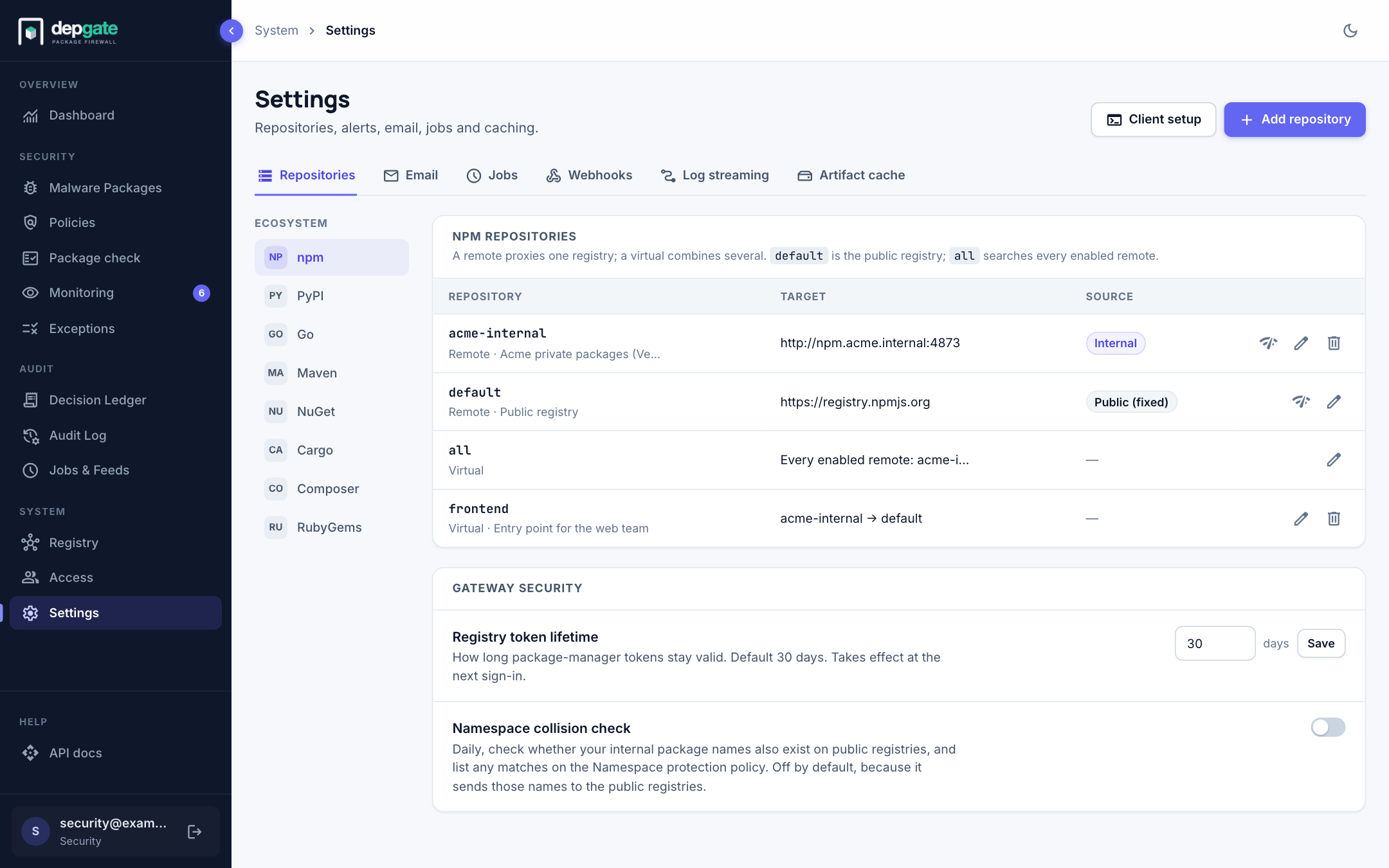
Kinds of repositories
| Kind | What it does | Example |
|---|---|---|
| Remote | Proxies one upstream registry, public or internal. | default → registry.npmjs.org; acme-internal → your Artifactory |
| Virtual | Serves several remotes behind one URL and asks them in order. | frontend → acme-internal, then default |
Every ecosystem starts with two reserved repositories:
default: the ecosystem's public registry.all: a virtual repository over every enabled remote of the ecosystem. New remotes join it automatically.
Both can be disabled but not deleted. A disabled repository rejects client requests.
Choose Client setup to open the Registry page with the settings a developer needs for the selected ecosystem.
Add a remote repository
Use a remote to connect an internal registry (Artifactory, Nexus, Verdaccio, GitHub Packages, GitLab, Azure Artifacts) or another public mirror.
Choose the ecosystem on the left, then Add repository. The form opens on its own page, with a summary on the right that shows the client URL as you type.
Fill in the form:
Field Description Type Remote. Key A short lowercase name. It becomes part of the client URL, for example /npm/acme-internal/.defaultandallare reserved.Description (optional) Shown in the list and on the Registry page. Upstream URL The registry's base URL, for example https://artifactory.example.com/api/npm/npm-internal.Source Internal registry for registries that hold your own packages, Public registry for everything else. See Remote source. Timeout (ms) and Retries How long to wait for the upstream, and how often to retry. Upstream authentication None, Basic (user name and password), Bearer token, or a custom header. Credentials are stored encrypted. Choose Create repository. The page stays open and offers Open client setup, which opens the Registry page on this repository's snippet.
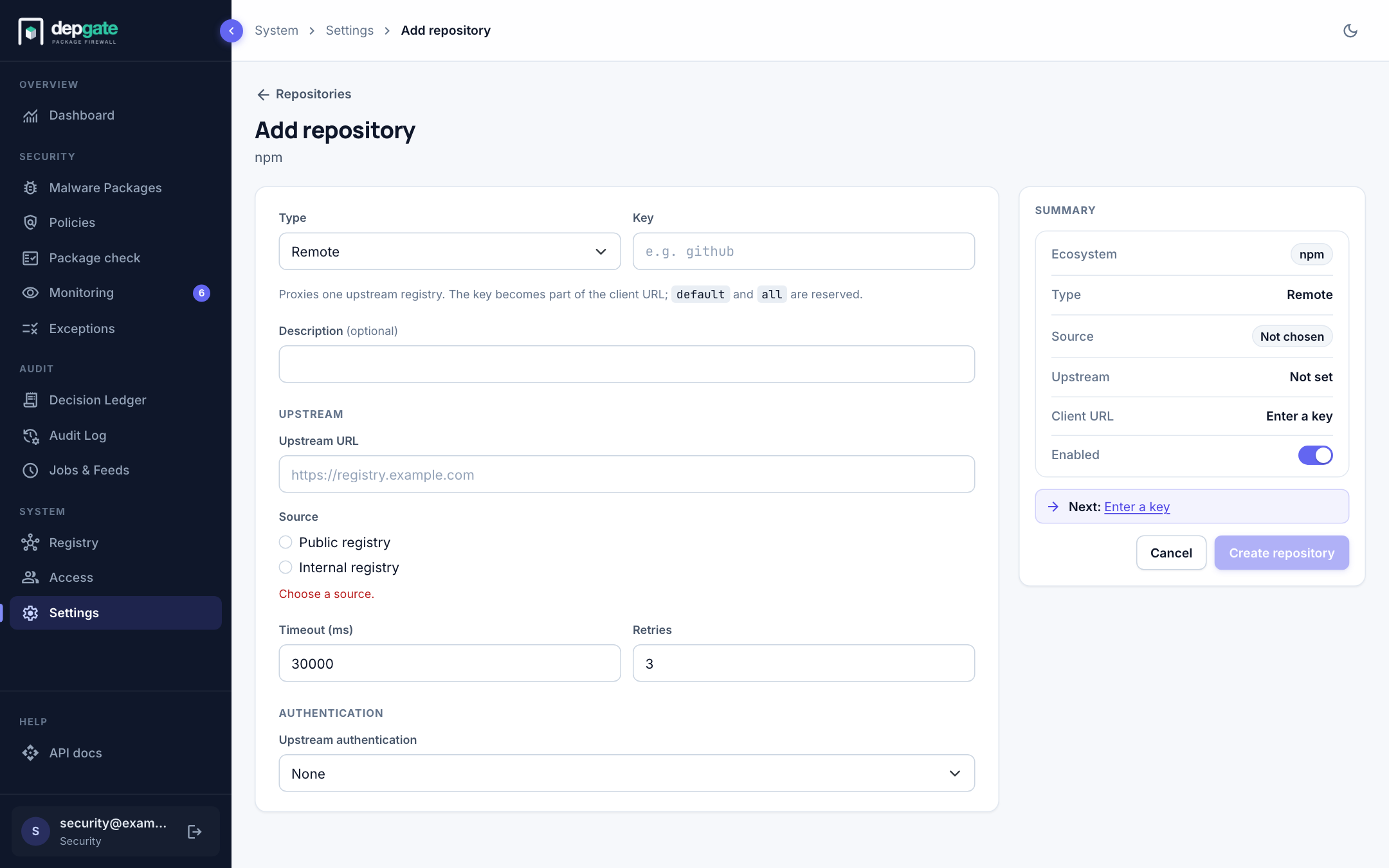
Choose the Test connection icon on the row to check that DepGate can reach the upstream with those settings.
Add a virtual repository
Use a virtual repository to give a team one URL over several remotes, for example your internal registry first and the public registry second.
- Choose Add repository and set Type to Virtual.
- Enter a key and select the member remotes.
- Put them in the Search order you want with the up and down arrows.
- Choose Create repository.
Search order
A virtual repository asks its remotes in order, and the first one that has the package serves it. The same applies to all; edit it to change its order.
- Only "not found" moves on. If a remote answers 404, the next one is asked. If a remote times out or refuses the connection, the search stops and the client gets 502: DepGate never silently falls back to the next remote (often a public registry). After repeated failures DepGate stops calling the remote for a short time; requests that remote would serve then get 503 with a
Retry-Afterheader, so package managers back off. The Decision Ledger records an Upstream unavailable entry. - Put internal remotes first. When a public remote comes before an internal one, the form warns that a public package with one of your internal names would be taken from it, and the list marks the repository with a warning icon. Namespace protection closes this gap completely.
Remote source
Each remote is either a Public registry or an Internal registry. The source matters in three places:
- Only internal remotes may serve names protected by a Namespace protection policy (unless the policy says otherwise).
- For public remotes, DepGate may look up a missing license or publish date on deps.dev, and Project health scores on the Scorecard API. For internal remotes it never does, so your internal package names never leave your network.
- The form warns This looks like a public registry when a remote marked internal points at a well-known public host.
default is always public. A new remote must be given a source when it is created.
Effective policies
Edit on a repository shows its Effective policies: every enabled policy that applies to it, in evaluation order. Use it to answer "what happens to a package downloaded through this URL?".
Delete a repository
Choose the trash icon. Before deleting, DepGate lists what changes: policies limited only to this repository are disabled (never widened to every repository), exceptions limited only to it are deleted, and pending waiver requests limited only to it are rejected.
Every change on this page is recorded in the Audit Log.
Gateway security
The Gateway security card holds settings that apply to every repository:
| Setting | Description |
|---|---|
| Registry token lifetime | How long the token in a developer's registry snippet stays valid. Default 30 days, at most 365; takes effect at the next sign-in. Browser sessions last 1 hour. A CI token lasts at most 1 day. |
| Namespace collision check | Daily check for your internal names on public registries. See Namespace protection. |