
Appearance
Connect your package manager
To install packages through DepGate, point your package manager at your organization's DepGate address and give it your registry token. The Registry page in DepGate generates the exact settings for you, with your token already filled in.
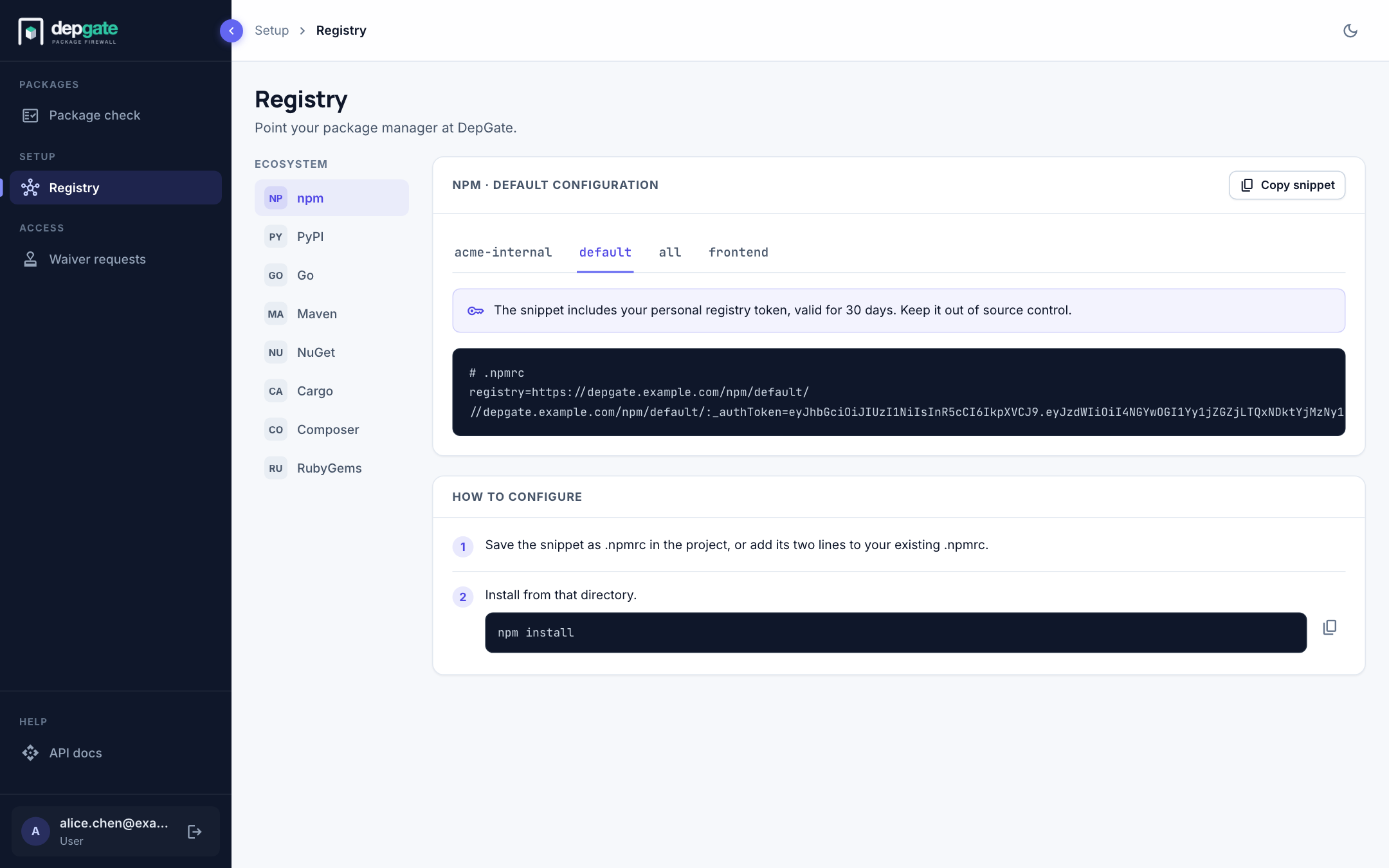
Get your settings
- Sign in to DepGate.
- In the sidebar, choose Registry.
- Choose your ecosystem on the left: npm, PyPI, Go, Maven, NuGet, Cargo, Composer or RubyGems.
- Choose the repository tab. Your security team will tell you which one to use;
defaultis the public registry, andallsearches every registry your organization has connected. - Choose Copy snippet, then follow the numbered steps under How to configure.
Keep your token private
The snippet contains your personal registry token. It is valid for 30 days by default, and every download it makes is attributed to you. Keep it out of source control: put it in your user-level configuration (for example ~/.npmrc), not in a file you commit.
When the token expires, sign in again and copy a fresh snippet from the Registry page.
Settings for each ecosystem
The examples below use https://depgate.example.com and the default repository. Replace <TOKEN> with your token, or copy the snippet from the Registry page instead.
ini
# ~/.npmrc (or .npmrc in the project)
registry=https://depgate.example.com/npm/default/
//depgate.example.com/npm/default/:_authToken=<TOKEN>
bash
pip config set global.index-url 'https://_:<TOKEN>@depgate.example.com/pypi/default/simple/'bash
go env -w GOPROXY='https://_:<TOKEN>@depgate.example.com/go/default,direct'xml
<!-- ~/.m2/settings.xml -->
<settings>
  <servers>
    <server>
      <id>depgate</id>
      <username>_</username>
      <password><TOKEN></password>
    </server>
  </servers>
  <mirrors>
    <mirror>
      <id>depgate</id>
      <mirrorOf>*</mirrorOf>
      <url>https://depgate.example.com/maven/default/</url>
    </mirror>
  </mirrors>
</settings>
bash
dotnet nuget add source 'https://depgate.example.com/nuget/default/v3/index.json' \
  --name depgate --username _ --password '<TOKEN>' --store-password-in-clear-text
toml
# ~/.cargo/config.toml
[registry]
global-credential-providers = ["cargo:token"]

[source.crates-io]
replace-with = "depgate"

[source.depgate]
registry = "sparse+https://depgate.example.com/cargo/default/"

[registries.depgate]
index = "sparse+https://depgate.example.com/cargo/default/"
token = "<TOKEN>"
bash
composer config -g repos.packagist composer 'https://depgate.example.com/composer/default/packages.json'
composer config -g http-basic.depgate.example.com _ '<TOKEN>'
bash
gem sources --add 'https://_:<TOKEN>@depgate.example.com/rubygems/default' --remove https://rubygems.org/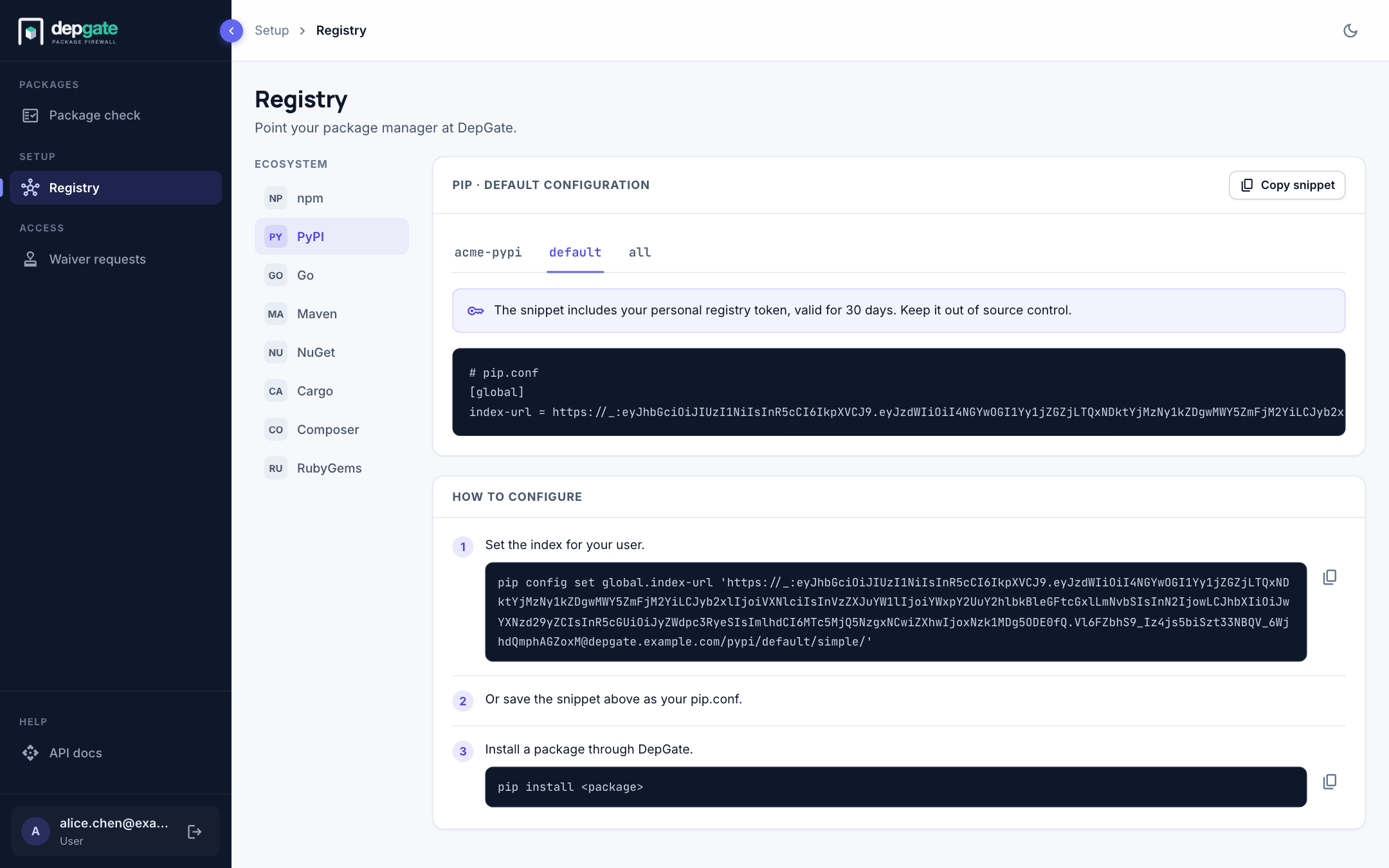
Notes per ecosystem
npm, Yarn and pnpm read the same .npmrc. npm sends the token as an Authorization: Bearer header on every request.
pip uses Basic authentication with _ as the user name and the token as the password. Poetry and uv accept the same index URL.
Go sends credentials only over HTTPS. ,direct lets the go command fetch a module directly when DepGate answers "not found"; leave it out to make sure every module goes through DepGate. DepGate does not proxy the checksum database: go still checks sum.golang.org. For internal modules, set GONOSUMDB to your internal module paths (your security team can give you the exact value).
Maven needs the <server> id and the <mirror> id to match (depgate). Gradle users configure a Maven repository with the same URL and credentials.
Cargo sends the token only to a registry whose index matches, and only with a credential provider configured. A project's .cargo/config.toml is read only when Cargo runs inside that project.
Composer stores the credentials in auth.json and sends them as Basic authentication.
Verify the connection
Install any package. For npm:
bash
npm view express version
npm install express
If the install succeeds, packages are flowing through DepGate. Your security team sees it counted on the Dashboard.
When a package is blocked
A blocked download fails with HTTP 403. The error message names the policy that blocked it and the reason, for example:
text
403 Forbidden - Package blocked by policy "Critical vulnerabilities":
GHSA-xvch-5gv4-984h (CVE-2021-44906): CVSS 3.1 9.8
What to do next:
- Open Package check to see which versions you can use. Usually a newer version is allowed, and Package check gives you the install command for it.
- If you really need the blocked version, request a waiver.
The 403 response also contains a checkUrl link that opens Package check for that exact package and version.
Common problems
| Symptom | Cause and fix |
|---|---|
401 Unauthorized | The token is missing, wrong or expired. Copy a fresh snippet from the Registry page. |
403 Forbidden | The version is blocked. See When a package is blocked. |
404 Not Found for an internal package | Internal names are served only from internal registries. Check you are using the repository your team told you to use (often all). |
502 Bad Gateway | DepGate could not reach the upstream registry. Retry, and tell your DepGate administrators if it persists. |
503 Service Unavailable | The upstream registry kept failing, so DepGate is pausing calls to it. Retry after the time in Retry-After (seconds). |
| Certificate errors | Your client does not trust the company CA. See Trusting your CA in package clients. |
For CI pipelines, use a CI token instead of your personal token. It lasts at most 1 day. See CI/CD pipelines.