
Appearance
Log streaming
Log streaming sends DepGate's events to your SIEM or log platform as they happen: refused downloads, malware requests, administrative changes, sign-ins, job failures and, if you want them, allowed downloads. Manage destinations under Settings → Log streaming (Security role).
Log streaming delivers events in batches to a log platform. For one alert per event in a chat channel or a ticketing system, use Webhooks.
Destination types
| Type | Sends to |
|---|---|
| Splunk | The HTTP Event Collector. DepGate appends /services/collector/event to the URL. Without a sourcetype, events arrive as depgate:decision, depgate:audit or depgate:job. |
| Datadog | The logs intake of the site you choose. |
| Elastic / OpenSearch | The _bulk API of a cluster or an Elastic Cloud endpoint, into a data stream or index, with an API key or a user name and password. |
| Sumo Logic | An HTTP Source. The URL contains the token, so it is stored like a secret. |
| Syslog | TLS (RFC 5425) or TCP (RFC 6587), as JSON or as CEF for QRadar and ArcSight. |
| HTTP | Any endpoint, such as Cribl, Vector or your own API: POST or PUT, one event per line or a JSON array, optional gzip, and your own headers. |
| Container output | Each replica writes events to its standard output as JSON lines tagged "log": "depgate.event", for the collector that already reads your containers (Fluent Bit, Vector, Splunk Universal Forwarder, Elastic Agent, Datadog Agent). The collector must read every DepGate container. Works without Redis. One such destination per installation. |
The list
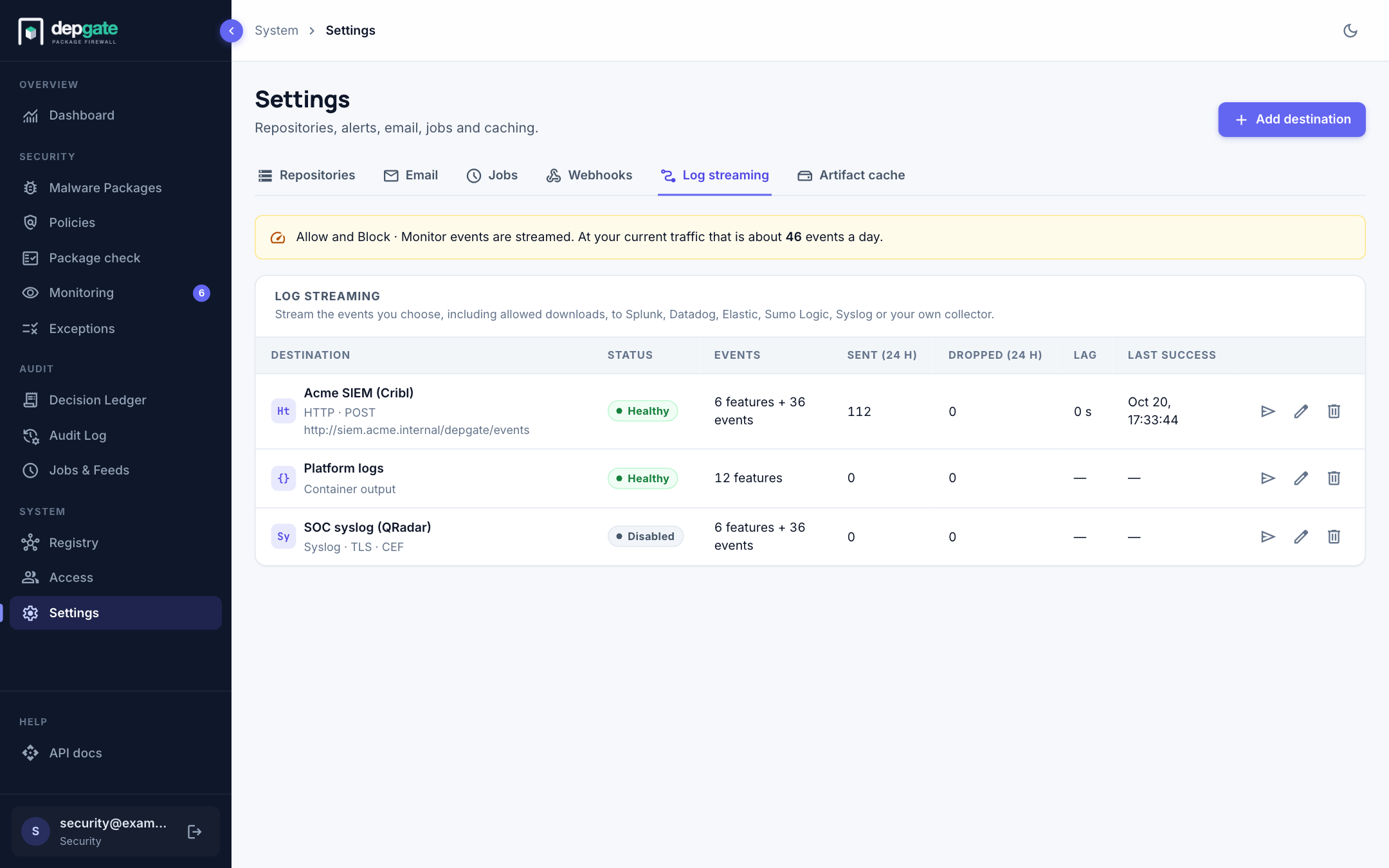
Each destination shows its status, the events it sends, how many events were sent and dropped in the last 24 hours, the lag (the age of the oldest event not yet delivered) and the last successful delivery. Choose the paper-plane icon to send a test event.
| Status | Meaning |
|---|---|
| Healthy | The last batch was accepted. |
| Waiting for events | Nothing has been sent yet. |
| Retrying | The destination answered with an error or timed out. DepGate keeps the events and retries with growing delays, up to five minutes apart. The row shows the last error. |
| Auth failed | The destination answered 401 or 403. DepGate keeps the events and tries again every 5 minutes. Fix the token or key, then send a test event. |
| Disabled | Turned off. Events are not kept for it. |
A banner above the list says when a destination sends the high-volume events Allow or Block · Monitor, and about how many events a day that is at your current traffic.
Add a destination
Choose Add destination. The form opens on its own page, with a Summary on the right.
Under 1 · Type, choose the destination type.
Under 2 · Connection, enter a Name and the type's connection settings:
Type Settings Splunk URL, HEC token, and optionally Index, Source and Sourcetype. Datadog Site, API key, and optionally Service and Tags. Elastic / OpenSearch URL, Authentication (API key, or Username and password), and optionally Data stream or index. Sumo Logic HTTP Source URL and optionally Source category. Syslog Host, Port, Transport, Format, and optionally Facility and App name. HTTP URL, Method, Body format, Compression, and optional Headers. Tick Secret on a header whose value is a credential. Container output Nothing. Destinations that speak TLS accept a CA certificate (PEM) for a private certificate authority. Secrets are stored encrypted and never shown again; when you edit a destination, leave a secret empty to keep it.
Under 3 · Events to send, keep the Recommended preset, choose Everything, or tick features and single events. See Choose the events.
In the summary, choose Send test event. The result shows whether the destination accepted it, with its answer.
Leave Send events now on and choose Create destination.
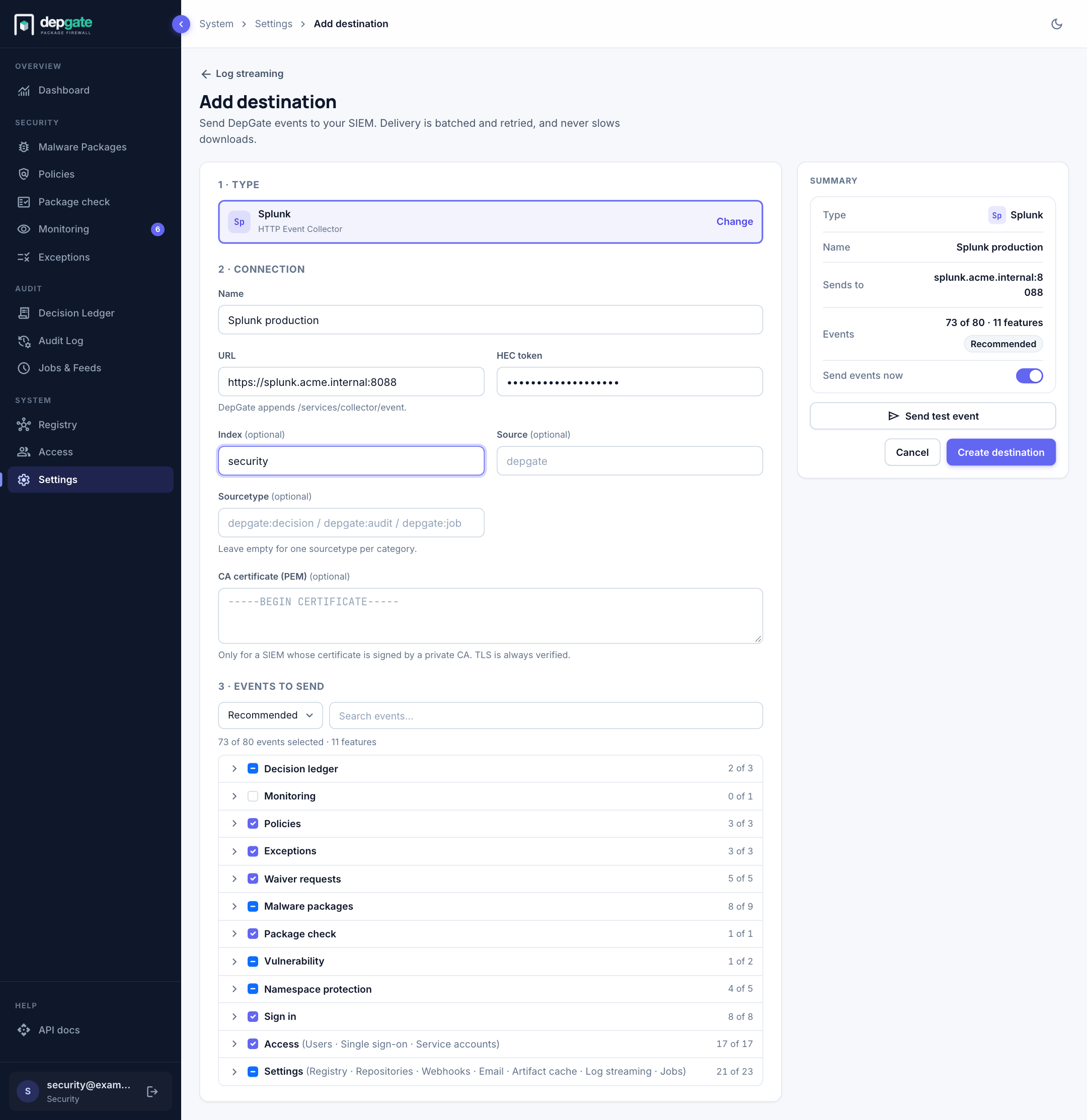
A destination with a plain http:// URL sends events unencrypted; the form warns about it. Use https:// unless the network is private.
Choose the events
Events are grouped by the page of the web interface they belong to: Decision ledger, Monitoring, Policies, Exceptions, Waiver requests, Malware packages, Package check, Vulnerability, Namespace protection, Sign in, Access and Settings. Tick a whole feature to send everything in it, including event types added in future versions, or expand it and tick single events.
Recommended selects every refused download, malware request, administrative change, sign-in and job failure. It leaves out three things you can add:
- Allow (Decision ledger): every allowed download.
- Block · Monitor (Monitoring): every download a policy in monitor mode would have blocked.
- Job completions, such as Feed sync completed.
Allow and Block · Monitor are high volume. The form shows about how many a day your installation produces at current traffic.
Event format
Every event is one JSON object, the same for every destination, the Decision Ledger, the Audit Log and the API:
json
{
  "schema": "depgate.event/1",
  "id": "0192f3a4-7c1e-7d0a-9b1f-2d6d1a2e4c55",
  "time": "2026-10-20T14:03:11.482Z",
  "category": "decision",
  "type": "BLOCK_ENFORCE",
  "feature": "decisions",
  "severity": "warning",
  "summary": "Blocked npm minimist@1.2.5: Critical vulnerabilities",
  "actor": { "kind": "user", "name": "alice.chen@example.com", "ip": "10.20.4.17", "authMethod": "registry_token" },
  "target": { "kind": "package", "ecosystem": "npm", "name": "minimist", "version": "1.2.5", "repository": "default" },
  "policy": { "id": "…", "name": "Critical vulnerabilities" },
  "reasons": ["GHSA-xvch-5gv4-984h (CVE-2021-44906): CVSS 3.1 9.8"],
  "depgate": { "version": "1.0.0", "instance": "depgate.example.com", "host": "depgate-7c9d" }
}| Field | Contents |
|---|---|
category | decision (a download), audit (a change, a sign-in or a package check) or job (a scheduled job finished). |
type | The event type, such as BLOCK_ENFORCE, POLICY_UPDATED or JOB_FAILED. |
feature | The group the event belongs to, as in the form. |
severity | info, notice, warning or error. In CEF these become 3, 5, 7 and 9. |
actor | Who caused the event: a person, a service account, a CI token, or system. CI token metadata is included. |
target | What the event is about: a package with its version and repository, or the object that changed. |
policy, reasons, details | The deciding policy, the reasons as shown in the web interface, and further details. Empty sections are left out. |
depgate.instance | The installation's name: DEPGATE_INSTANCE_NAME, or the host name of its public address. |
Delivery
- Events never slow downloads: they are recorded first and sent by the DepGate replicas in the background, each batch once.
- A batch holds up to 500 events or 1 MB, or whatever arrived within 2 seconds.
- An answer of
2xxcounts as delivered.408,429and5xxare retried, honouringRetry-After. Another4xxmeans the destination rejected the batch; those events are dropped and counted, because DepGate builds every event itself and a rejected batch is something to report.401and403set the status to Auth failed. - Events wait for a slow or paused destination up to a limit of 200,000 per stream (
EVENT_STREAM_MAX_LEN). Beyond it the oldest events are lost; the list shows how many and when.
Prometheus metrics: depgate_events_published_total, depgate_stream_sent_total, depgate_stream_dropped_total (by reason) and depgate_stream_lag_seconds.
Creating, changing and deleting a destination is recorded in the Audit Log.