
Appearance
How DepGate works
This page explains what happens inside DepGate when a package manager asks for a package, and introduces the concepts used throughout the documentation. For where DepGate fits in your environment and how it is deployed, see Architecture.
The request flow
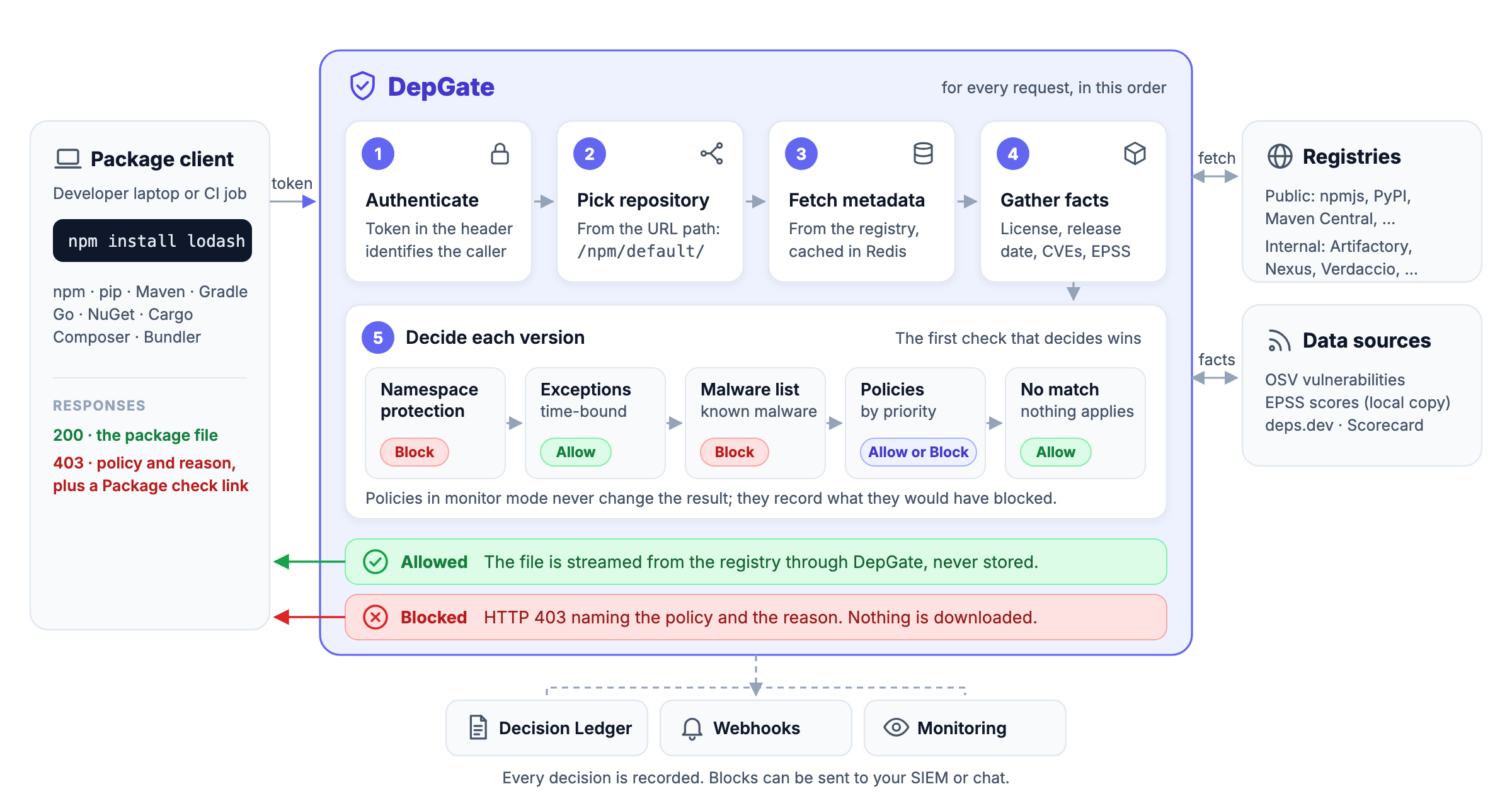
- Authenticate. Every request carries a token: a person's registry token, a CI token, or a service-account key. DepGate records who made each download.
- Pick the repository. The URL names the ecosystem and the repository, for example
https://depgate.example.com/npm/default/. The repository decides which upstream registries are asked. - Fetch metadata. DepGate reads the package's metadata from upstream and caches it in Redis, so popular packages are answered quickly and upstream outages are smoothed over.
- Gather facts. For the versions being decided, DepGate looks up what the policies need: license, publish date, known vulnerabilities (from OSV), exploit likelihood (EPSS) and project health (OpenSSF Scorecard). Facts are cached too.
- Decide each version. An allowed file is streamed to the client, or served from the artifact cache when it is there. A blocked download is refused with HTTP 403 and a reason that names the policy, and a link to Package check.
Download links in the metadata are rewritten to point at DepGate, so clients never fetch files from the registry directly and cannot bypass the gateway.
The order of checks
For each package version, DepGate applies these checks in order. The first one that decides wins.
| Order | Check | Result |
|---|---|---|
| 1 | Namespace protection. Is the name one of your internal names, requested from a remote that may not serve it? | Blocked. Nothing can lift this except an exception scoped to the namespace policy. |
| 2 | Exceptions. Is there an active exception for this package and version? | Allowed. |
| 3 | Malware list. Is the package or version a known-malicious package? | Blocked. |
| 4 | Policies, lowest priority number first. Does the version match the policy's rule? | The policy's action: Block or Allow. |
| 5 | Nothing matched. | Allowed. |
Policies in monitor mode are evaluated too, but they only record what they would have blocked; they never change the result.
Main concepts
- Ecosystem: A package format and its clients: npm, PyPI, Maven, Go, NuGet, Cargo, Composer or RubyGems.
- Repository: A URL that clients use, such as
/npm/default/. A remote repository proxies one upstream registry. A virtual repository combines several remotes behind one URL and asks them in order. Every ecosystem starts withdefault(the public registry) andall(every enabled remote). See Repositories. - Policy: A rule plus an action. "Block every version with a vulnerability of CVSS 9.0 or higher" is one policy. Each policy has exactly one rule, a priority and an ecosystem, and can be limited to some repositories. See Policies overview.
- Monitor mode: A Block policy in monitor mode blocks nothing. It records what it would block, so you can review the impact before you enforce it.
- Exception: A time-bound permission for a package (and optionally specific versions) that would otherwise be blocked. Developers ask for one with a waiver request; the security team approves it.
- Decision Ledger: The record of every download DepGate refused, and why. Changes people make in DepGate are in the Audit Log.
Roles
- User: developers and anyone who installs packages. Copies registry settings, checks packages and requests waivers.
- Security: the team that runs DepGate. Also manages policies, exceptions, repositories, people and integrations.
- Service account: for CI/CD. Cannot sign in; mints download tokens that last at most 1 day.
See Access for what each role can do.
Next steps
- Architecture: components, what DepGate stops, and deployment scenarios.
- Create a policy: put the order of checks to work.
- Monitor before enforcing: roll out new policies safely.