
Appearance
Email
DepGate sends two kinds of email: the invitation a new person receives when you add them, and password reset links. Both contain single-use links, and people always choose their own password.
Email is optional. Without it, DepGate shows you the invitation link to send yourself, and Forgot password? cannot send mail.
Set up SMTP
Go to Settings → Email.
Fill in your mail server:
Field Description SMTP host Your mail server or relay, for example smtp.example.com.Port Usually 587(STARTTLS) or465(TLS).Username and Password If your server requires authentication. The password is stored encrypted and never shown again. From address The sender, for example DepGate <no-reply@example.com>. Use an address your mail server is allowed to send as.Use TLS from the start Turn on only for port 465. Port 587 with this off uses STARTTLS. Choose Save.
Choose Send test email to me. DepGate sends a message to your own address and shows the server's error if it fails.
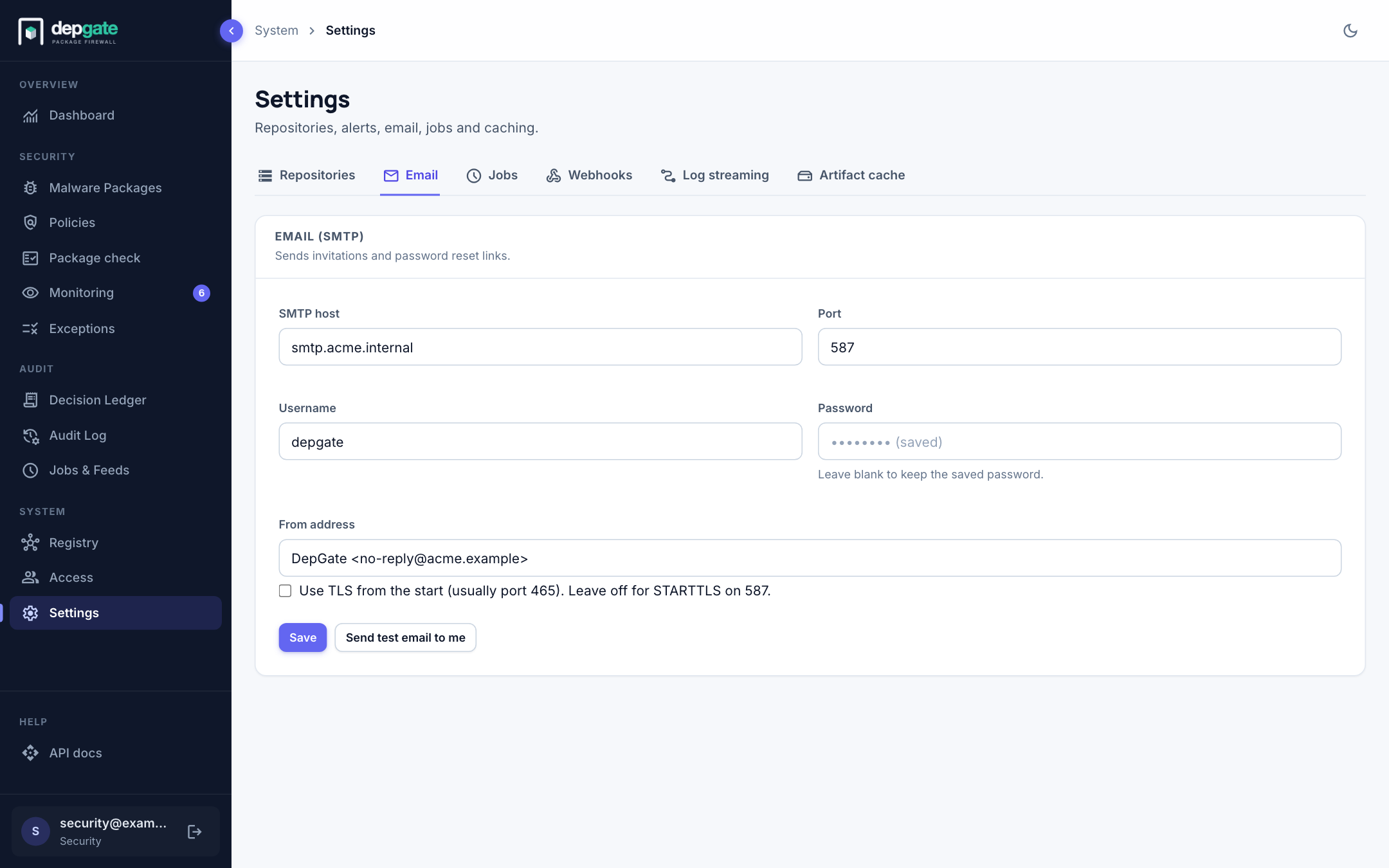
You can also set the mail server with environment variables (SMTP_HOST, SMTP_PORT, SMTP_SECURE, SMTP_USER, SMTP_PASSWORD, SMTP_FROM). Settings saved in the web interface take precedence.
Where the links point
Links in emails start with UI_URL when it is set (it defaults to GATEWAY_URL in the production Compose file). Links are never built from the address in an incoming request, which an attacker could forge.
Link lifetimes
| Link | Valid for | Setting |
|---|---|---|
| Invitation | 7 days | INVITE_EXPIRY_HOURS |
| Password reset | 60 minutes | PASSWORD_RESET_EXPIRY_MINUTES |
Each link works once.
Troubleshooting
| Problem | What to check |
|---|---|
| The test email reports connection refused | The host or port is wrong, or a firewall blocks DepGate from reaching the mail server. Email does not use the outbound HTTP proxy. |
| Add user shows a link instead of "invitation sent" | Email is not set up, or sending failed. The link shown works the same way. |
| Links open the wrong address | Set UI_URL to the address people use. |
| Forgot password? sends nothing | The address must belong to an existing account. The page answers the same way either way, on purpose. |
Testing email without a real mail server
Mailpit catches every message and shows it in a web inbox, without delivering anything. Run it with docker run -d -p 1025:1025 -p 8025:8025 axllent/mailpit, set the SMTP host to the machine running it (host.docker.internal when DepGate runs in Docker), port 1025, TLS off, and open http://localhost:8025 to read the messages.