
Appearance
Check a package
Package check tells you, before you install, which versions of a package you can use, which are blocked and why, and the newest version that is allowed. It uses the same policies and data as a real download, so the answer matches what your package manager will get. A check downloads nothing and never counts as a block; it is noted in the Audit Log.
Every signed-in user can use it. Open Package check in the sidebar.
Check a package
- Choose the Ecosystem.
- Type the Package name. Use
groupId:artifactIdfor Maven,vendor/packagefor Composer, and the module path for Go. - Optionally choose the Repository. Use the same repository as your package manager, because some policies apply only to some repositories.
- Optionally type a Version to check a specific one, even an old one.
- Choose Check, or press Enter.
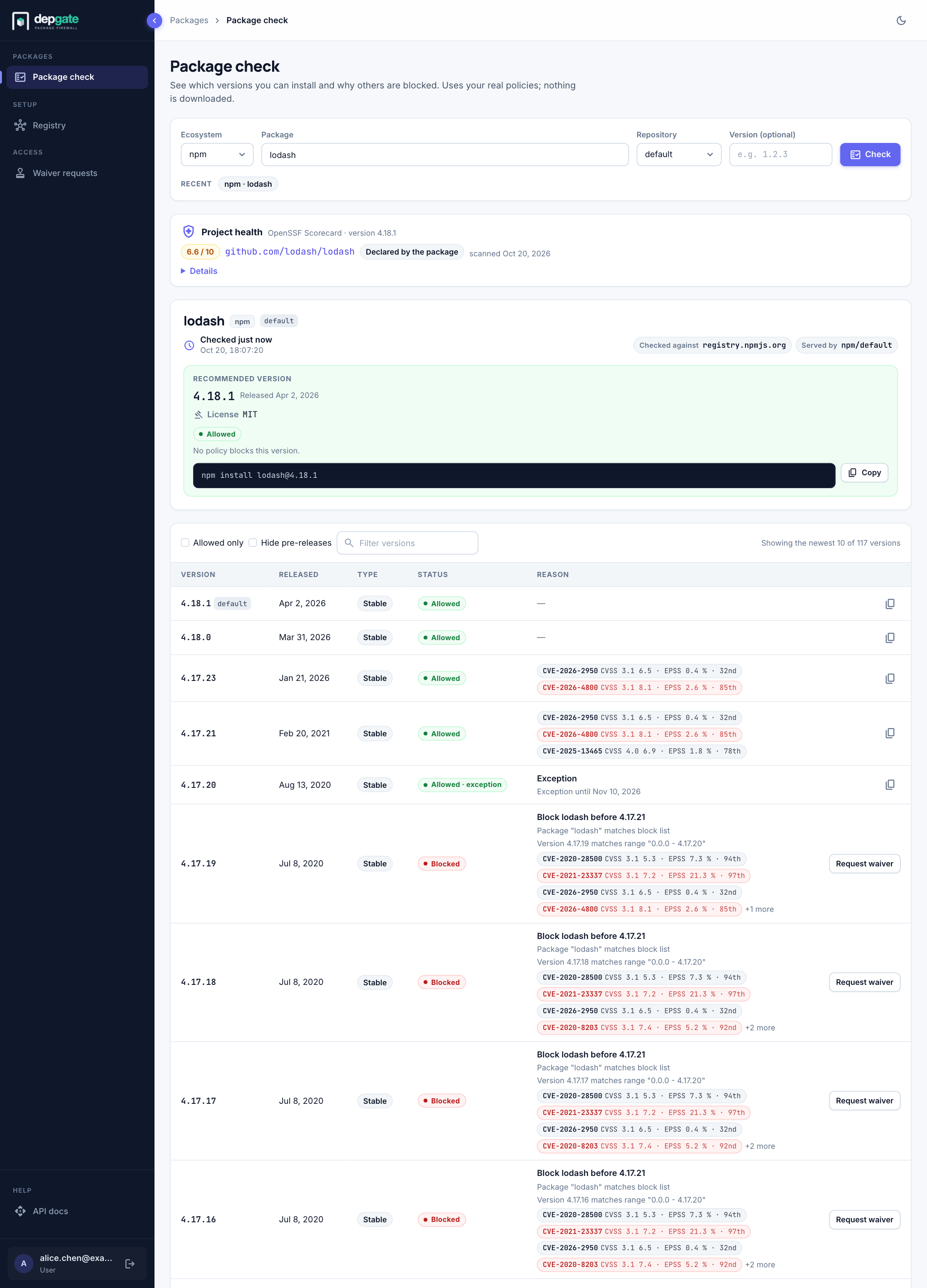
Your last five checks appear as chips under the search bar, so you can repeat them with one click.
Read the results
- Recommended version: The newest allowed stable version, with its license, its status, the policy that decided it and an install command you can copy. The status tells you when it is only allowed by an exception, or when a policy in monitor mode would block it once enforced. If no stable version is allowed, the newest allowed version of any kind, labelled with its type. Licenses can change between versions, so check the recommended version's license before you upgrade.
- Version you asked for: When you enter a version, it appears next to the recommendation with its license, its status, the policy that decided it and the reasons. If it is blocked, you can request a waiver from here.
- Version table: The most recent versions, newest first, with release date, release type (Stable, Pre-release and so on), status and reason. Use Allowed only, Hide pre-releases and the version filter to narrow the list. Load more checks the next ten versions.
Above the results, the result header says when the check ran, which registry it was Checked against, the order a virtual repository Searched in, and which remote the package is Served by.
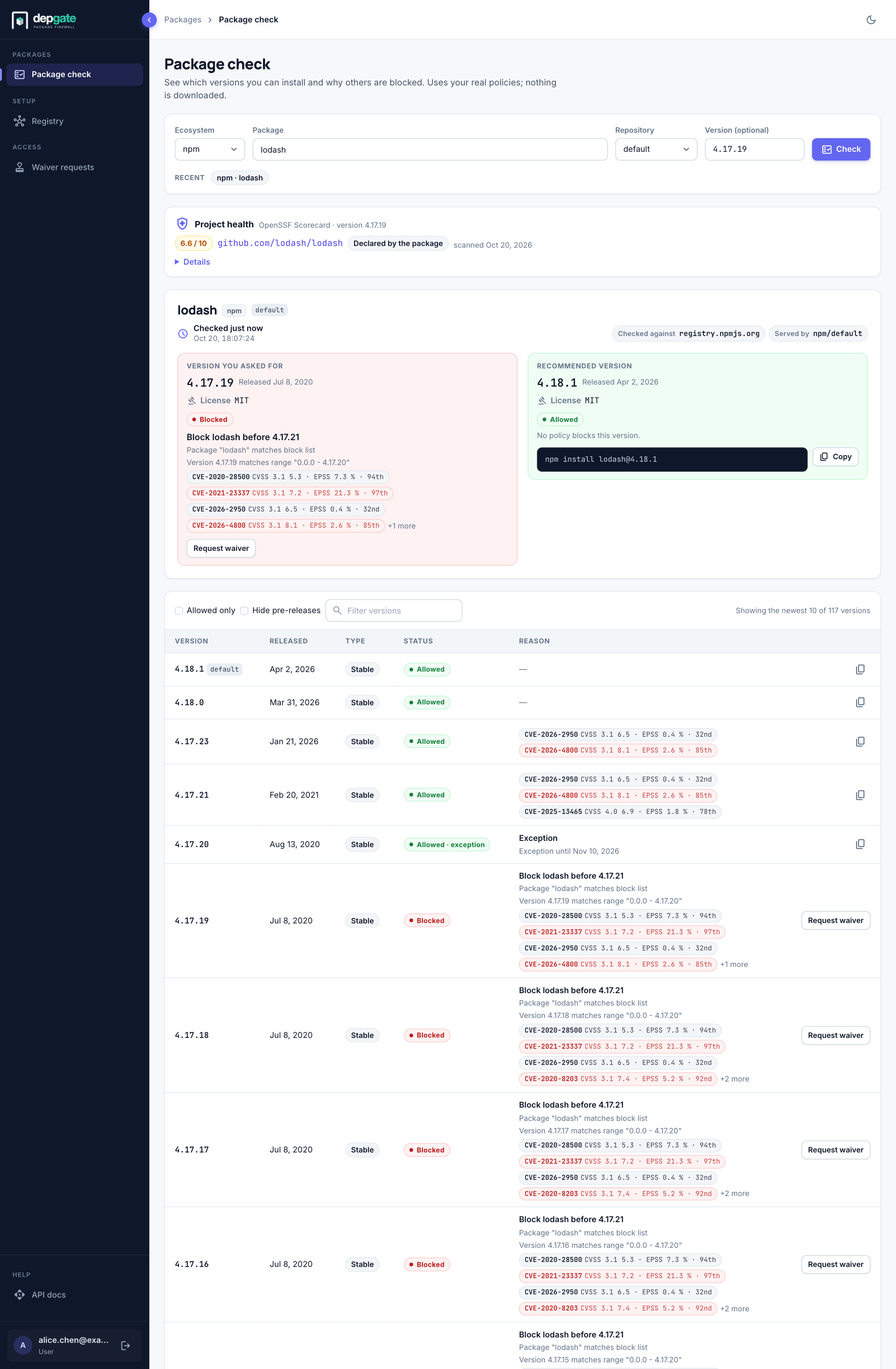
Project health
For a public package whose source repository is on GitHub or GitLab, a Project health card shows the package's OpenSSF Scorecard result: the overall score out of 10, the repository, whether the package declared that repository itself or DepGate found it on deps.dev, and when it was last scanned. Choose Details to see the score of each check, such as Code-Review or Dangerous-Workflow. When there is no result, the card says why: the package declares no repository, Scorecard has not scanned it, or Scorecard could not be reached. This is the same data a Project health policy uses.
Statuses
| Status | Meaning |
|---|---|
| Allowed | No policy blocks this version, or an exception covers it. |
| Allowed · exception | Blocked by a policy, but an active exception lets it through until the date shown. |
| Allowed · would be blocked by "…" (monitoring) | Allowed today, but a policy in monitor mode matches it. It will be blocked when that policy is enforced. Choose another version if you can. |
| Allowed · vulnerability data unavailable | Allowed only because vulnerability data could not be loaded. It is never recommended. |
| Blocked | A policy or the malware list blocks it. The reason column says which, and why. |
| Not checked · timed out | The check ran out of time before reaching this version. Check again; the second check is faster. |
A version blocked only because it is too new shows when it can be checked again. It may still be blocked by another policy then.
Vulnerabilities
Each vulnerability appears as a chip with its ID, its CVSS version and score, and its EPSS exploit likelihood, for example CVE-2021-23337 · CVSS 3.1 8.1 · EPSS 21.3 % · 97th. Red chips are rated High or Critical. CVE IDs link to the advisory on osv.dev.
Whole-package banners
- Malicious package: the package is on the malware list. No version is allowed and waivers are not offered.
- Blocked by policy: a policy blocks every version of this package.
Share or bookmark a check
The address of the page contains the check, for example:
text
https://depgate.example.com/package-check?ecosystem=npm&package=lodash&version=4.17.20&repository=defaultOpening it fills in the form and runs the check. When a download is blocked, the 403 response includes this link as checkUrl.
If you need a blocked version
- Users choose Request waiver on the blocked row. The waiver form opens with the package and version filled in. See Request a waiver.
- Security users choose Add exception instead, which creates the exception directly.
Limits
- A check evaluates the newest 10 versions, the version you asked for, and the version a plain install would pick.
- Each user can run 30 checks per minute.
- A check stops after 10 seconds and returns what it has.
Pipelines can call the same check through the API (POST /api/package-check) to fail a build when a pinned version is not allowed. See the REST API.